
Earn more by dashing where your own data says.
Tipper records your DoorDash deliveries automatically, then shows you which areas have actually paid you, when you actually earn, and how long you actually wait. Not vibes — your own numbers.
DoorDash's claimed zone wait vs. what Tipper actually timed — side by side, by time of day. Sample data.
30-day free trial, then $9.99/month. Cancel anytime.
Android 8.0+ · download it from this site, not the Play Store.
How it works
Turn it on once
Tipper doesn't need your DoorDash login. Turn on Tipper in Android's accessibility settings and it reads the Dasher app's screens while you deliver — the same info you already see. One-time setup.
Dash like normal
Tipper saves addresses, tips, wait times and the offers it can read as they appear on screen. No typing in a parking lot. A review inbox catches anything it isn't sure about.
Plan around what's paid you
Open Insights and the maps to see where you've been tipped best, where offers have come fast for you, and what each day and time of day has paid you per delivery.
Features
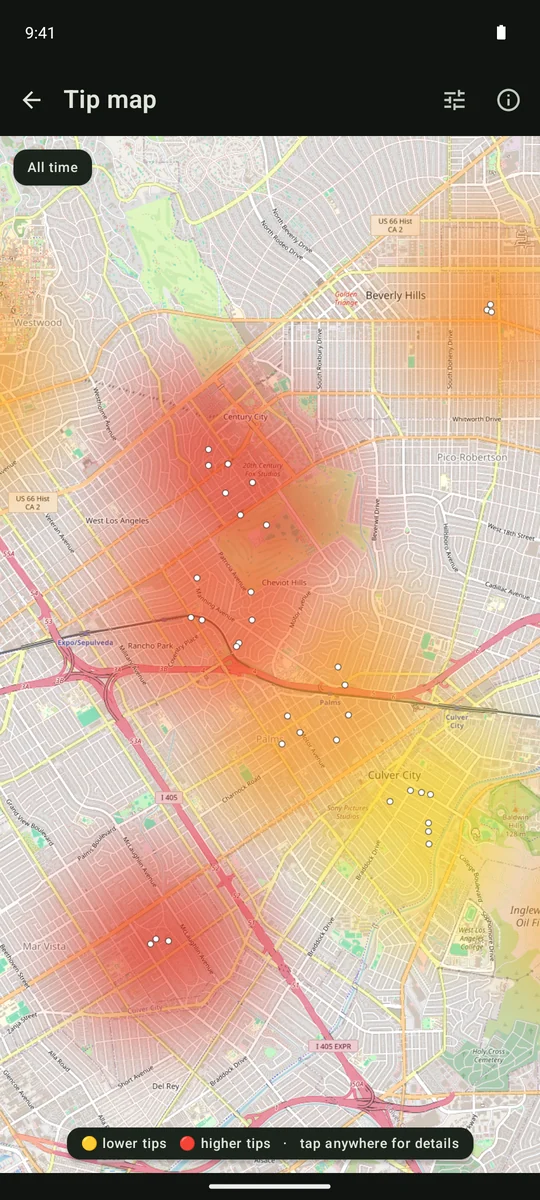
DoorDash tip heatmap — where you've been tipped
See where you've been tipped better and worse: addresses you've delivered to, colored by the average tip Tipper recorded at each one.
Best days & times — when you earn
Tipper shows what each day and time of day has paid you per delivery, and ranks them only when one clearly stands out, so you can plan shifts around what has actually paid.
Offer speed map
Where DoorDash offers have come fast for you and where you've sat waiting — from your own timed waits while parked, by time of day.
The honesty check
DoorDash's claimed "zone offer wait" vs. what you actually waited — side by side. How long DoorDash drivers actually wait →
Mileage & Prop 22
Turn on Pay per hour and allow location. Tipper then times each delivery and counts the miles you drive, so it can show what each offer pays per hour. In California, a separate switch adds a Prop 22 estimate in Insights. A mileage card adds up the offer distances Tipper captured for your deliveries this year. It's a starting point for taxes, not a mileage log.
Automatic capture
While you dash, Tipper records tips, addresses, your waits and the offers it can read from the Dasher screen, and a review inbox holds anything it isn't sure about for you to check.
See it in action.


Screenshots on this page show sample data, not promised earnings. Select a screenshot to view it full size.
One simple price.
First 30 days free — card required, cancel anytime.
- Automatic tip capture
- Tip & offer-speed maps
- Insights, mileage & Prop 22 tools
- Every update included
$9.99/month after your free trial. Cancel anytime.
Already subscribed? Download the app.
Try Tipper free for 30 days
Cancel anytime.
Download for AndroidAndroid 8.0+. Installed directly (sideloaded) — a quick guide is included. See the install guide →
Tipper has no account and no server that collects your data, and the app doesn't send your deliveries, tips or earnings to me unless you choose to email me a log from its Settings. What the app records, and what does leave your phone →